Getting my TOTP data out of Twilio's Authy app thanks to the GDPR

By Thomas Steiner. Written on . Security
As every responsible Internet user, I use two-factor authentication (2FA) for my important accounts. For a long time, I depended on Google's Authenticator app, but because early versions of the app weren't backed up to the cloud (not a problem anymore) and because as a Google Android dogfooder I switch devices frequently, I turned to Twilio's Authy, which at the time already supported cloud backup and cross device synchronization. Authy has both iOS and Android apps, and also offered a desktop app, but for whatever reason they shut down the desktop app three years ago.
Now every time I needed a token, I had to get one of my phones out. Annoying, but not annoying enough for me to actually switch away from Authy. I have 33 accounts in there, and unfortunately Authy offers no export option. For a while, you could hack your way to your data by installing an old version of their desktop app and sniffing the network traffic, but they eventually patched that loophole. Modern Android and iOS versions (for good reason) also make it incredibly hard to sniff mobile traffic, plus I have corporate devices that prevent me from installing the required apps and certificates.
So my data was locked into Authy, with my choices being to just be lazy and stick with it, or bite the bullet and set up 2FA again for each account. Guess what I did! Correct, I entered each account one by one, turned off 2FA, set it up agai… Haha, LOL, of course I did not. I stuck with Authy and walked to one of my phones like a Neanderthal every time I needed a token.
Until I remembered that under the European Union's 🇪🇺 General Data Protection Regulation (GDPR), I have the right to request my personal data from any service provider, including Authy. If you live in the EU, you have, too. Here's the request I sent to Twilio (privacy@twilio.com) to get my TOTP data out of Authy:
Dear Twilio Privacy Team,
I am a resident of [Your EU country] and a user of the Authy application. Under the EU General Data Protection Regulation, I am exercising my right of access (Article 15) and my right to data portability (Article 20) with respect to the personal data you process about me.
Please provide a complete copy of all personal data associated with my Authy account, identified by:
Authy ID: [Your Authy ID]
Phone number: [Your phone number]
Contact email: [Your contact email]I specifically request that your response include the stored authenticator data for my account, namely the encrypted TOTP token seed values together with any associated salts, initialization parameters, and key-derivation parameters required to decrypt them, and, for each token, the issuer or account name, the number of digits, the period, and the algorithm. Please also specify the encryption scheme used to protect the token seeds, including the cipher and mode, the key-derivation function, its iteration count, and the hash function. The token seeds are stored encrypted under a password known only to me, and I am asking for that encrypted data as you hold it, so that I can decrypt it myself.
Under Article 20, please provide the token data in a structured, commonly used, and machine-readable format, for example JSON.
Please confirm receipt of this request and respond within one month, as required by Article 12(3). If you consider any part of this request unfounded or excessive, please explain your reasoning for each element rather than declining as a whole.
Thank you.
Kind regards,
[Your name]
They came back quickly, asking for the following verification details:
- All current and past email addresses associated with the Authy account.
- All current and past phone numbers associated with the Authy account.
- A confirmation code sent through text message to the number linked to the account, which should be sent back with the reply.
I responded with the requested information, and a few weeks later they sent me a link to a secure file transfer on twilio.sendsafely.com and let me download two CSV files with the data. One was an Authy Personal Information Request - Exported Tokens (1).csv file with the columns name, encrypted_seed, salt, and iv. The name is just the name of the token I had chosen. The others are explained below.
encrypted_seed: The actual TOTP secret (the seed used to generate 2FA codes), encrypted so it's unreadable in plain text.salt: Random data mixed in when deriving the encryption key from the encryption password (prevents precomputed "rainbow table" attacks and ensures the same password doesn't always produce the same key).iv: The random value (initialization vector) fed into the cipher itself, ensuring that encrypting the same seed twice (even with the same key) produces different ciphertext each time.
The other file, Authy Personal Information Request - Authy Personal Information (2).csv, was a text file (despite the .csv extension) with CSV-ish metadata about my account and its associated tokens.
,,,,,
User Information,,,,,
Phone number(s),"(+49) [REDACTED]
",,,,
E-mail (primary and secondary),"[REDACTED], [REDACTED]",,,,
"Last Sync (The last time one of your devices communicated to Authy)
-Time is in UTC","Oct 10, 2026 - 06:37
",,,,
"Used at (The last time you verified an Authy TOTP token)
-Time is in UTC","Jun 01, 2018 - 10:27
",,,,
"Created (When the Authy user was created)
-Time is in UTC","Jul 06, 2017",,,,
,,,,,
Devices linked to the Authy user,,,,,
Name,Created,Device Creation IP,User agent,Device ID,Last sync
Android,"Sep 30, 2019",[REDACTED],Dalvik/2.1.0 (Linux; U; Android 10; Pixel 3a Build/QQ1A.190919.002) Mobile,[REDACTED],"Sep 18, 2021"
[SNIP]
Android,"Jun 23, 2026",[REDACTED],Dalvik/2.1.0 (Linux; U; Android 17; Pixel 11 Pro Fold Build/CD1A.260612.002) Mobile,[REDACTED],"Oct 10, 2026"
,,,,,
Authy native tokens,,,,,
ID,Name,Email,Cellphone,Member/Owner,
[REDACTED],Twilio,[REDACTED],[REDACTED],Member,
,,,,,
Authenticator tokens,,,,,
Name,Logo,Created at,Updated at,,
GitHub:tomayac,GitHub,"Jul 17, 2025","Jul 17, 2025",,
[SNIP]
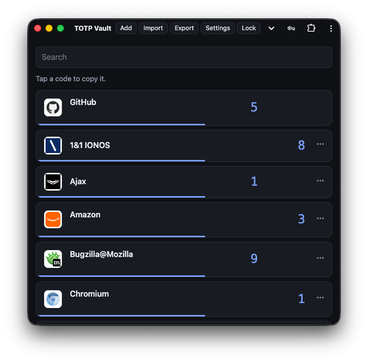
I threw both files at Claude and asked it to create me a TOTP Vault PWA that going forward I can use on all of my devices, desktop or mobile, with the TOTP data backed up to a private GitHub repo. After a few iterations back and forth with the LLM, I can now scan QR codes and add new TOTP tokens seamlessly using the Barcode Detector API. The app is fully offline capable thanks to Service Workers. It looks almost like a native app because I use Window Controls Overlay. Each TOTP line has a guessed (but overrideable) icon provided by Icon Horse. And it is my PWA with features tailored to my needs, like always sorting entries by most recently used, a search input that clears after copying the token, plus, of course, token import and export functionality for all possible providers and standards:
- CXF: The FIDO Credential Exchange Format, unencrypted, for password managers that import it.
- Bitwarden / Vaultwarden: Unencrypted JSON for importing data in Bitwarden / Vaultwarden. I use Vaultwarden as a backup on my devices.
- otpauth links: An unencrypted text file with one
otpauth://link per line, for apps like Ente Auth. - Encrypted vault (not really a standard, but what I use for my backups): A CXF document inside a JSON Web Encryption envelope, locked with my password. Yes, the below screenshot is redacted to not show any sensitive TOTP data like the actual account names or the token values (though the latter is really just me being a tin foil hat, it's totally unnecessary).
It's kind of sad that I had to use the GDPR sledgehammer to get my own TOTP data out of Twilio's Authy, but at least now I have full control over it, and I'm, once more, thankful that the GDPR exists. I would also like to credit Authy for dealing very professionally and promptly with my data request.